- launch checklist
- buyers guide
- web development
9 Things to Check Before You Sign Off a New Website
A checklist you can run yourself before paying the final invoice. No technical knowledge needed — and three of these are the ones everyone skips.

Md Ariful Islam
4 min read
The site looks good. The invoice has arrived. Everyone wants to be finished.
This is exactly the moment when problems get signed off, because nobody wants to be the person who slows things down over something small.
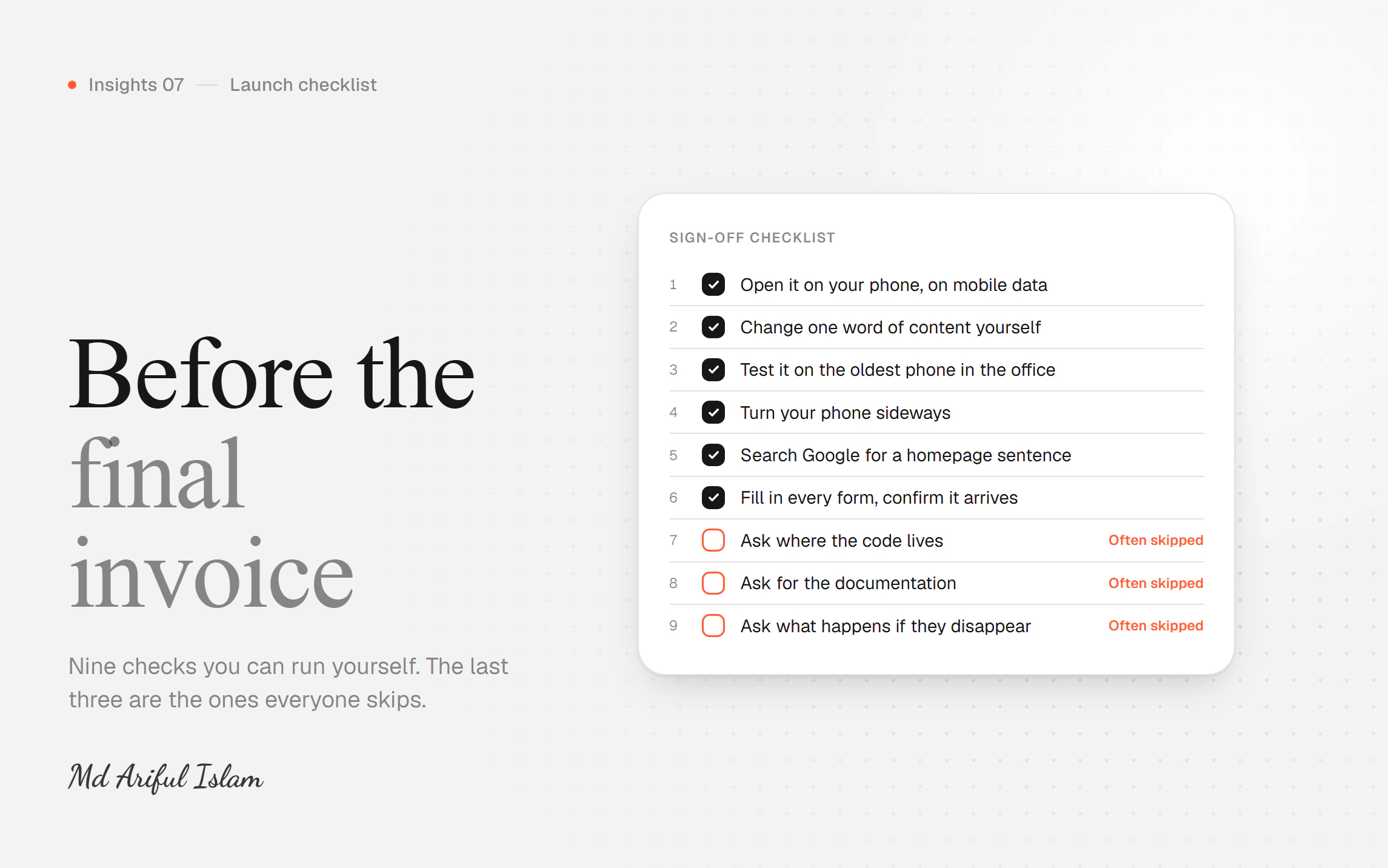
Here are nine checks you can run yourself in about an hour. None of them need technical knowledge. The last three are the ones people skip, and they're the ones that cost the most later.
1. Open it on your phone, on mobile data, in a private tab
Not on office wifi. Not on the laptop. Turn wifi off, open an incognito tab so nothing is cached, and count the seconds until you can read the main heading.
Under 2 seconds is good. Over 4 and you're losing most of your mobile visitors before they see anything.
This one check catches more problems than the other eight combined.
2. Change one word of content yourself
Log in and change a headline. Can you do it? How long did it take?
If the answer is "I can't" or "I have to email the developer," you don't own your website — your developer does. Every future change costs money and waits in someone's queue.
This is worth catching now, while there's still an invoice unpaid.
3. Test it on the oldest phone in the office
Not the newest one. The four-year-old Android someone still uses.
Your visitors are on a mix of devices, and the slow ones are where problems show. A site that's fine on a new iPhone can be unusable on a mid-range phone from 2022.
4. Turn your phone sideways
Landscape mode. Does anything break, overlap, or disappear?
It takes ten seconds and it's surprisingly often broken, because nobody thinks to check it.
5. Search Google for a sentence from your homepage
Copy an exact sentence, put it in quotes, search it. Give it a couple of weeks after launch first.
If nothing comes up, your pages may not be visible to search engines at all. This happens more than you'd think — a setting that blocks search engines during development gets left switched on at launch.
Genuinely, this has cost companies months of traffic.
6. Fill in every form and confirm the message arrives
Every contact form, every signup, every enquiry box. Fill it in properly and check the message actually lands in the right inbox.
Forms fail silently more often than anything else on a website. The visitor sees "thank you." Nobody receives anything. You find out when someone phones to ask why you never replied to their email from three months ago.
Check the spam folder too, while you're there.
7. Ask where the code lives — and make sure you have access
Not your developer. You.
The code should be in a repository (GitHub, GitLab) that your company owns, with you as owner or admin. Same for hosting, the domain, and analytics.
This is the single most common way companies get held hostage. Everything is in the developer's personal account, the relationship ends badly, and you can't get to your own website.
Ask now. It's an awkward question after a disagreement.
8. Ask for the documentation
Not user manuals. Notes for the next developer: how the project is set up, how to run it locally, where things are, anything unusual and why.
If there isn't any, the next person starts by guessing — at your expense, at their hourly rate.
A useful test: ask to see documentation they wrote for a project they no longer work on. That's the honest version, written when nobody was watching.
9. Ask what happens if they disappear tomorrow
Directly. "If you were unavailable for three months, what would I need?"
A good answer covers access, documentation, and how someone else would pick it up. It might include names of people who could.
A bad answer is "don't worry, that won't happen."
The three everyone skips
Seven, eight and nine.
They're skipped because they feel awkward — like you're planning for the relationship to fail. And because at sign-off, everyone is pleased and nobody wants friction.
But they're the only three on this list that protect you eighteen months from now, when the site needs a change and the person who built it has moved on.
The first six protect your visitors. The last three protect you.
One more thing worth doing
Write down the numbers on launch day. Load time, monthly visitors, enquiries per month, where you rank for the terms that matter.
In six months you'll want to know whether this worked. You can only answer that if someone recorded the starting point — and almost nobody does.
Save this for your next project. And if you'd like a second pair of eyes on a site before you sign it off, send me the URL — I'll run these checks and tell you what I find.