- headless cms
- wordpress
- contentful
- strapi
Headless CMS vs WordPress: Which One Do You Actually Need?
What 'headless' really means in plain English, what it changes for your team, and the honest cases where WordPress is still the better choice.

Md Ariful Islam
5 min read
Somebody quoted you for a "headless CMS migration" and you nodded along. Then you went back to your desk and had no idea what you'd just agreed to.
Let me fix that. No jargon, and I'll tell you when WordPress is still the right answer — because quite often it is.
What WordPress actually does
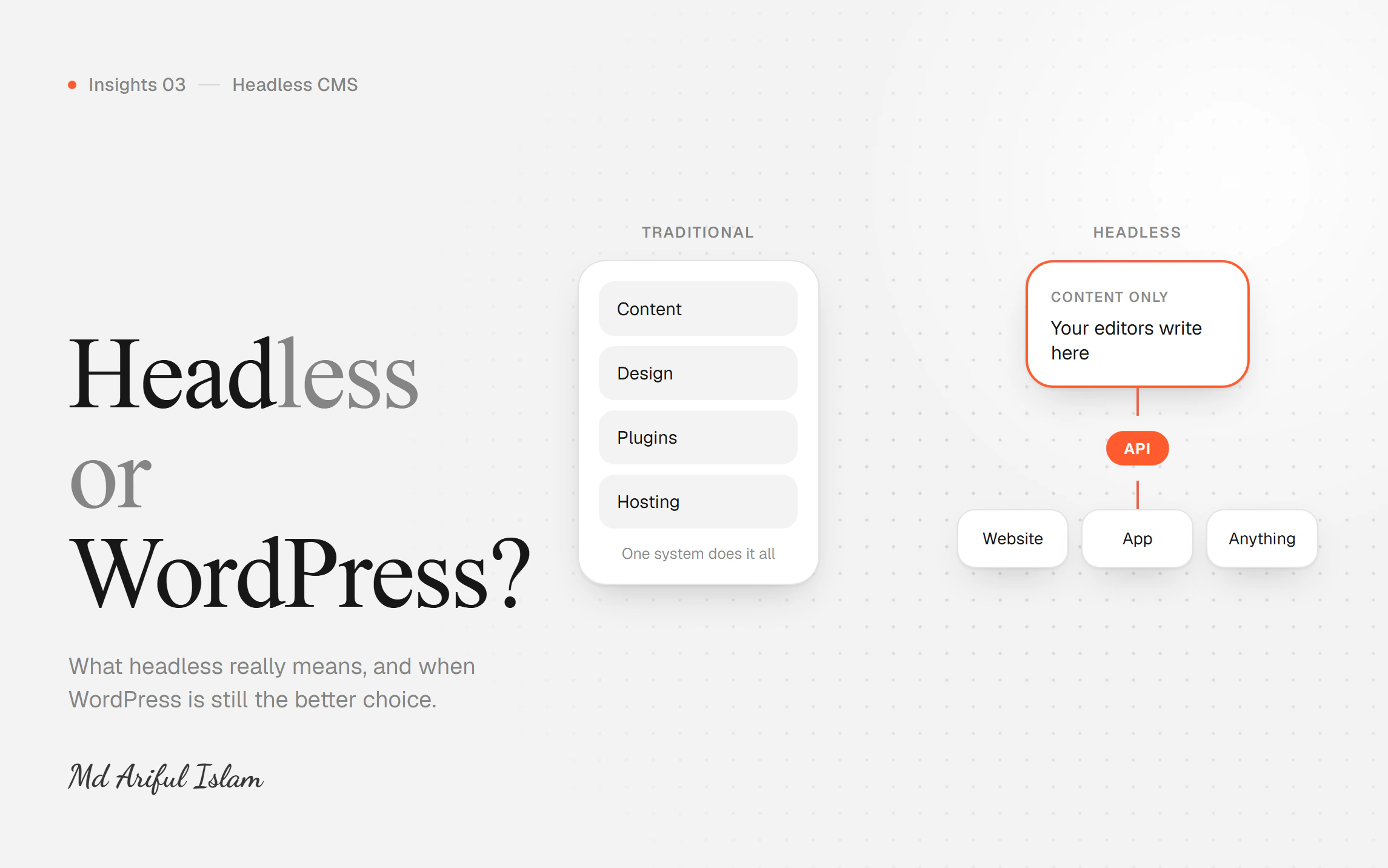
Your website and your content live in the same box.
Someone visits a page. WordPress wakes up, asks the database for the content, runs whatever plugins you have installed, assembles the page, and sends it over. Every visit, every time.
It works. Roughly 40% of the web runs this way. But three things follow from that design:
It's slow by default, because the page is built fresh on every request.
Everything is tangled together. Your content, your design, and your functionality all live in the same system. A plugin update can break your layout. That's not a bug — it's what happens when everything shares a house.
Your content is stuck inside it. Want to show the same product descriptions in a mobile app? WordPress wasn't designed for that.
What "headless" means
You split the two apart.
Your content lives in one place — Contentful, Strapi, Sanity, whatever fits. It's a clean editing tool. Your marketing team logs in, writes, hits publish. That's all they see.
Your website is built separately and pulls the content in. Usually the pages are prepared in advance, so visitors get a finished page rather than one assembled on demand.
That's the whole idea. Content in one box, website in another, talking to each other.
The word "headless" just means the content system has no front end of its own. It's a body without a head — you attach whatever head you like.
What changes for you, practically
Your marketing team stops waiting. They change a headline, it's live in five minutes. No developer, no deploy, no ticket.
Pages load fast. Often well under a second, because they were built before anyone asked for them.
You can redesign without touching content. Build a completely new site, point it at the same content, done. With WordPress, a redesign usually means moving content too.
Your content isn't trapped. Website, mobile app, kiosk, email — same content, many places.
Plugin updates stop breaking your site, because there are no plugins in the middle.
What it costs you
I'd be selling you something if I skipped this part.
More setup work. You're building the front end rather than installing a theme. That's real hours.
Another subscription. Contentful and similar tools have monthly costs. Strapi can be self-hosted for free, but then you're maintaining it.
No plugin shortcuts. WordPress has a plugin for everything. Want a booking form? Install one, done. Headless means someone builds it, or you integrate a separate service.
A smaller pool of people who can work on it. More WordPress developers exist than headless developers. That affects what happens if you need to replace whoever built it.
When WordPress is still the right answer
Genuinely, often.
Your site is mostly a brochure. Five pages, updated twice a year. Headless is overkill.
You lean heavily on plugins. Memberships, complex forms, event bookings, a WooCommerce store that works. Rebuilding all of that headless is expensive and buys you very little.
Your budget is under a few thousand dollars. A good WordPress site beats a rushed headless one, every time.
Someone on your team already knows WordPress. Real internal knowledge is worth a lot.
Nobody is complaining. If your site is fast enough, your team can update it, and it isn't costing you customers — leave it alone. "Modern" is not a business reason.
When headless is worth it
Speed affects your revenue. E-commerce, SaaS signups, lead generation. If a second of load time has a number attached, the case makes itself.
Your team publishes constantly and keeps hitting developers as a bottleneck.
You'll redesign again within two years. The split makes the second redesign dramatically cheaper.
Content goes to more than one place.
Search traffic matters and your site is slow. Page speed is part of how Google ranks you. Not the biggest part, but it decides close calls — and it's affecting every visitor whether or not it affects your ranking.
The middle option nobody mentions
You can keep WordPress as your editing tool and put a fast, modern front end in front of it.
Your team keeps the editor they know. Visitors get a fast site. You skip the cost of a new content platform and skip retraining everyone.
It isn't right for every situation, but it's overlooked — usually because it's less interesting for the developer than a full rebuild.
How to decide in one question
Is your website a cost or a revenue channel?
A cost — it has to exist, people look you up — then WordPress, done well, is fine. Spend the money on something that grows the business.
A revenue channel — people find you, decide about you, and buy from you there — then speed and publishing freedom are worth paying for, and headless usually wins.
The mistake isn't picking wrong. It's spending headless money on a brochure, or running a revenue site on a stack that loses you customers every day.
Not sure which side you're on? Send me your site and tell me what your team finds frustrating about it. I'll give you a straight answer, including "leave it alone" if that's the right one.